When a buyer searches an industrial distributor's catalog for a discontinued part, they still need to know which product they found. Replacing the old record's description and specifications with a successor's data can make the result look familiar while describing a different item. Give buyers both product identities so they can compare them. Retain each product's facts and record the supplier's replacement recommendation as a link between them.
Key takeaways
- Keep the discontinued product and its proposed replacement as separate records, with separate identifiers and specifications.
- Preserve the supplier's relationship wording and source. An alternative is not automatic permission to substitute.
- Review the relationship and customer-facing language without turning supplier lifecycle status into a claim about your own stock.
A replacement link is not a product match
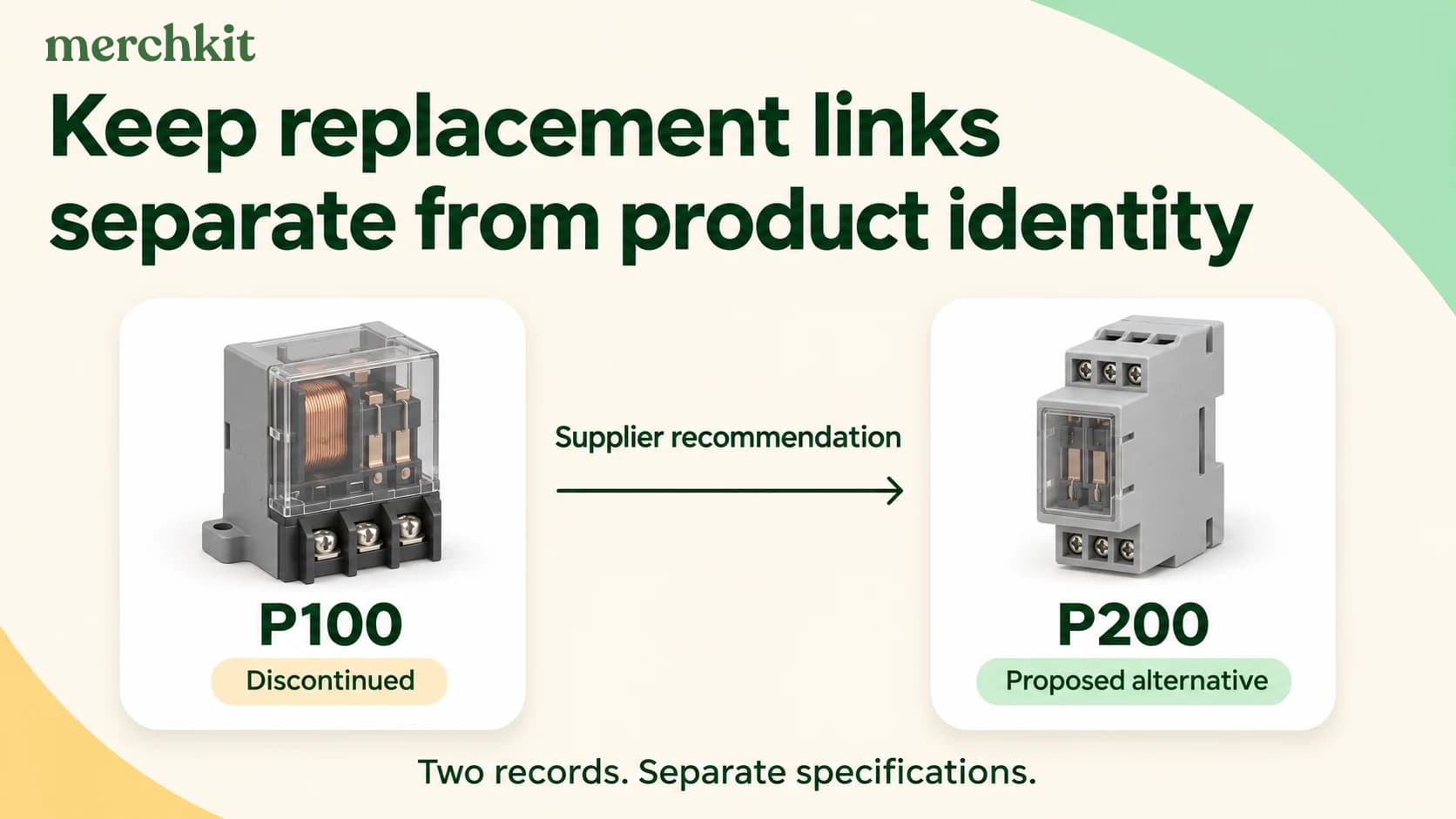
Suppose a supplier notice says P100 is discontinued and lists P200 as an alternative. Your team has already confirmed the identities of both products. The task is now to describe the connection between them, not decide whether the two part numbers refer to the same item.
If the P100 record becomes P200, a buyer checking an old equipment list could see P200 specifications under the number they searched. A catalog editor answering the buyer then has to recover the old specifications to explain what changed.
If you still need to establish which product a supplier row describes, resolve that first with the separate workflow for matching supplier CSV rows to products.
Preserve facts on each side of the relationship
For the example, retain P100's supplier part number, your internal identifier, description, specifications, and supporting documents. Add the lifecycle statement from the supplier notice to P100. Do not replace P100's dimensions, ratings, or documents with P200's simply because P200 appears in the same notice.
P200 needs its own record and source-backed specifications. When an attribute is missing, treat it as missing rather than copying P100's value forward. The approach to extracting product attributes from supplier spec sheets still applies to each product independently.
Store the link separately from those facts. Record the predecessor, the proposed successor, the supplier's exact relationship label, the source document or URL, its date or version where available, and any stated conditions. Add who reviewed the relationship and when. A reviewer can then check the recommendation without confusing the two sets of specifications.
The link should have a direction: P200 is listed as an alternative to P100. That does not establish that P100 is an alternative to P200. Nor does a later P200-to-P300 link prove that P300 can replace P100. Review each relationship against its own evidence.
Keep the supplier's qualification visible
Replacement labels carry meaning that can vary by supplier. Clipsal's Australian obsolescence guidance distinguishes Direct from Alternative. Its Alternative label allows for differences in one or more attributes and asks readers to consult supporting literature for suitability. That is Clipsal's terminology, not a universal classification your catalog should impose on every supplier.
Schneider Electric USA also warns that a replacement may not be an exact one-for-one match and directs readers to review product literature and the application. A relationship can help a buyer find another product to evaluate without claiming that it will fit every use of the old one.
For P100, customer-facing language could say: "Supplier lists P200 as an alternative. Review P200 specifications and suitability for your application." Link the P200 name to its own product information. Do not strengthen that wording to "identical replacement," "fully compatible," or "automatic substitute" unless the applicable evidence supports the claim and your team has approved it.
Your catalog review establishes what the source says and what you will display. It does not, by itself, establish engineering suitability for every installation. Keep that decision with the appropriate product or technical reviewer when it is required.
Separate lifecycle status from availability
A supplier discontinuation notice describes the product's lifecycle. Your inventory record describes what your business has available to sell. Keep them separate rather than treating "discontinued" as proof that you have no stock or that remaining stock cannot be sold.
Likewise, an out-of-stock item is not necessarily discontinued. For P100, record the supplier's lifecycle status from the notice and check your own inventory and commercial policy independently. That avoids a catalog label saying more than the evidence establishes.
Product identity also matters in channel data. Google Merchant Center requires a stable, unique ID for each different product and says not to reuse an old product's ID for another product, even when the original is no longer sold. If P200 is a different product, do not recycle P100's Merchant Center ID for it. Keep channel identifier decisions distinct from the replacement relationship.
Review the link before it reaches buyers
Check the source notice against both records. Does it name this exact P100 and P200, including any relevant suffix or market? Does your link preserve the supplier's wording and conditions? Can a reviewer open the source and see the basis for the relationship?
Then inspect the customer-facing result. A search for P100 should not present P200's specifications as P100's. If you show a successor link, the buyer should be able to identify the old product, recognize that another product is being proposed, and open that product's information before deciding what to do next.
If two supplier documents disagree, record the conflict and hold the relationship for review. The reviewer needs to establish which source applies before the catalog recommends another product.
How this gets done in Merchkit
Bring a discontinued-product notice and both product records to a Merchkit demo. Use that pair to evaluate the work your team needs to handle:
Help buyers compare the right products. Check how the proposed workflow keeps P100 and P200 distinct while connecting them, without overwriting the original product's facts.
Spend less time reworking each notice. Test whether the supplier's repeated labels can be handled consistently, and identify which conditions still need manual interpretation.
Give reviewers the evidence they need. Ask how source documents and unresolved differences would reach the right reviewer without another round of searching through supplier files.
Check the output before approving it. Review the proposed catalog or channel output for separate identifiers and qualified relationship wording. Confirm what your team must approve before buyers see it.
Book a demo to evaluate a discontinued-product and replacement workflow using your own supplier example.
Frequently asked questions
Should I overwrite a discontinued product record with its replacement?
Keep the discontinued product and its proposed replacement as separate records. Retain the old product's identifiers and specifications, then add a qualified link to the successor's own information. Overwriting the original record can make a buyer searching an old part number read specifications for a different item.
Does a supplier-listed alternative mean a product is a direct replacement?
Use the supplier's own definition and conditions. Clipsal's obsolescence guidance distinguishes Direct from Alternative and says alternatives can differ in one or more attributes. Schneider Electric USA also advises checking product literature and the application. Do not convert those qualified recommendations into a universal compatibility claim.
Is a discontinued product automatically out of stock?
A manufacturer's lifecycle status does not establish your inventory position. Record discontinuation from the supplier's notice, then check your own stock and commercial policy separately. An out-of-stock product may still be current, and a discontinued product may still have remaining inventory; neither status should be inferred from the other.
Can I reuse a discontinued product's Google Merchant Center ID for its successor?
No, if the successor is a different product. Google's ID requirements prohibit recycling an identifier for another product, even when the original is no longer sold. Keep each product's channel identity separate from the relationship that helps buyers discover its proposed replacement.
Can I automatically follow a chain of replacement recommendations?
Check each replacement recommendation on its own. In the hypothetical P100-to-P200-to-P300 example, the two documented links do not establish that P300 replaces P100. Check the exact pair, product versions, market and supplier conditions before presenting that additional recommendation. A reverse relationship also needs its own support.
What evidence should I keep with a replacement relationship?
Record both exact product identifiers, the direction of the recommendation, the supplier's relationship wording, source, date or revision and applicable conditions. Add the review decision and reviewer. If sources disagree, keep the proposed link unresolved until someone establishes which evidence applies; a populated replacement field alone is not approval.