When you add a chair in several upholstery choices and finishes, each listing needs to describe the version a shopper can actually buy. Copying the same description into every listing can leave a fabric chair with leather care instructions. Store the details that are true for every chair together, and keep each version's upholstery, finish and care information with its SKU.
Key takeaways
- Share a detail across the family only when the supplier confirms it's true for every version.
- If a variant is missing a detail, check with the supplier rather than copy the answer from another version.
- List only combinations the supplier sells, with the matching image and product page for each one.
Share only the details that every version has in common
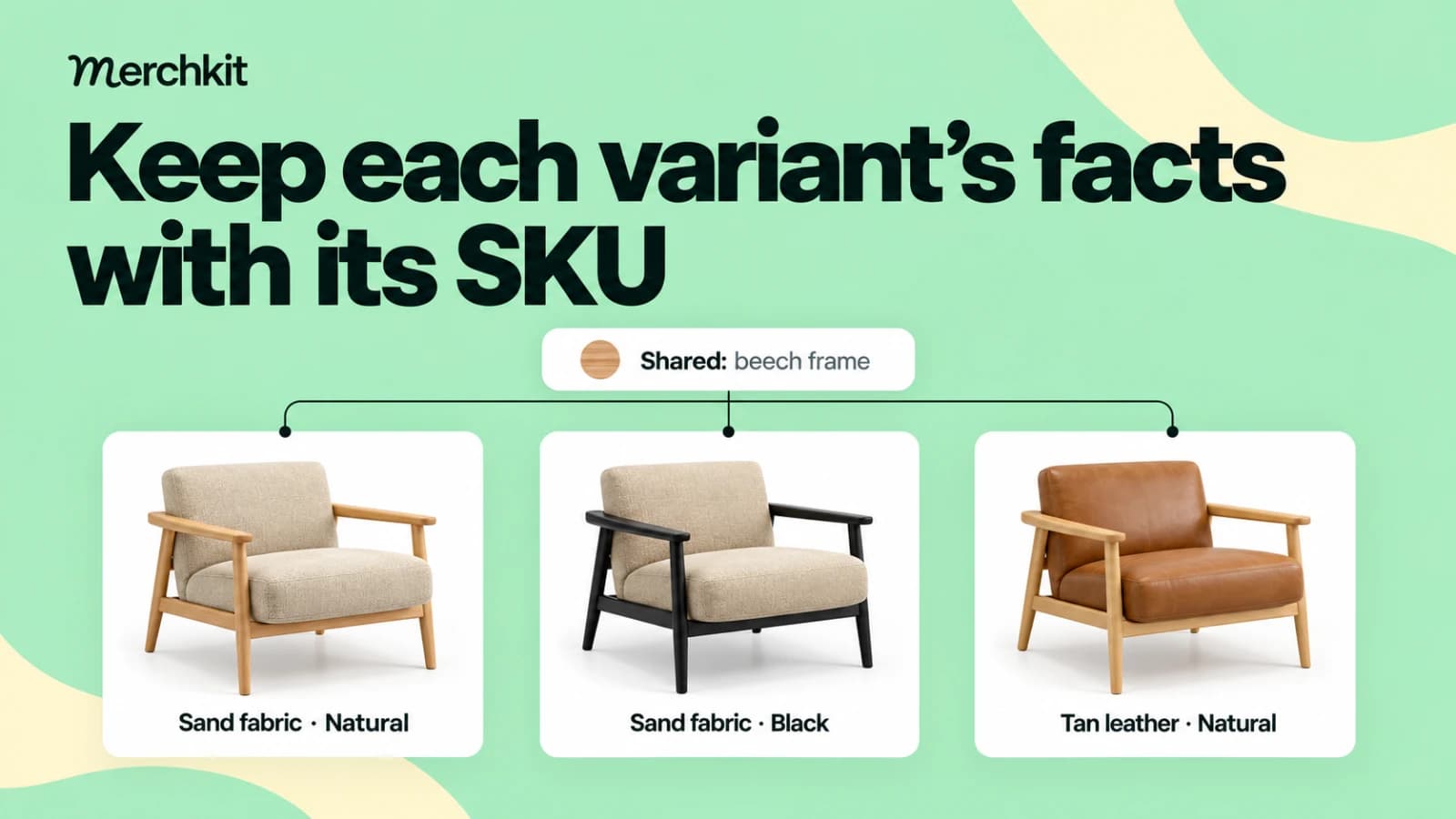
Suppose you're adding a chair that comes in fabric and leather. If both versions have the same beech frame, you can store that frame detail once and use it for both listings. Their cleaning instructions still need to stay separate: someone buying the fabric chair shouldn't be shown advice meant for leather.
Catalog systems often call the shared record a parent and each sellable version a child or variant. Using a detail from the parent is called inheritance. It saves you updating the same fact in several places, but first check that it applies to every version, whether it's a material, a care instruction or a warranty term.
Before deciding which details to share, check the supplier's information against the table below. These are ways to organize your catalog, not fields every marketplace requires.
| Information | Where it belongs | Evidence to check |
|---|---|---|
| Brand, family name, common construction | Parent, if genuinely shared | Supplier confirms applicability across the family |
| Selected fabric, finish, size and image | Exact variant | SKU or option combination matches the source |
| Care instructions | Variant unless confirmed common | Instructions cover that fabric and finish, not just a similar item |
| Price and availability | Sellable variant's offer | Current commercial data for that selection |
| Unknown or conflicting detail | Internal review status | Resolve the gap before making that claim |
Recheck shared details when the supplier adds a new version. If the next chair has a metal frame, it can't use the beech-frame description just because it belongs to the same collection.
Work from the combinations the supplier actually sells
Suppose you're adding the Vela lounge chair family to your catalog. The supplier lists the three versions below. They all have a beech frame, but the fabric and leather versions come with different care instructions.
| Sellable SKU | Upholstery | Frame finish | Applicable care source |
|---|---|---|---|
| VELA-P-N | Sand polyester | Natural | Fabric-care document F1 |
| VELA-P-B | Sand polyester | Black | Fabric-care document F1 |
| VELA-L-N | Tan leather | Natural | Leather-care document L1 |
You can save the beech-frame detail once for all three chairs. Keep each chair's upholstery, finish and photo with its SKU. Both polyester chairs can use care document F1, while the leather chair needs L1. Sharing F1 with the whole family would give the leather buyer the wrong instructions.
The supplier sells the fabric chair with either natural or black legs, but the leather chair only comes with natural legs. So your catalog needs three versions, not four. Check the supplier's actual product list before adding a leather chair with black legs, or shoppers could select a chair they can't order.
When you check the black-legged fabric chair, look for its SKU, VELA-P-B, in the supplier's file. A collection page showing all three chairs won't tell you which details belong to that one. For help extracting those details, see our supplier spec-sheet guide.
Check missing details instead of filling them from another chair
Now suppose the supplier adds a blue wool chair but hasn't sent its cleaning instructions. Copying the polyester chair's care text would fill the empty field, but it wouldn't tell you how to care for wool. Ask for the right document before publishing that advice.
Check what your catalog does when a variant's field is blank. Some setups use the parent's value instead. If you've put the polyester cleaning instructions on the parent, the new wool chair could pick them up automatically. Keep those instructions with the polyester versions so a missing answer doesn't turn into the wrong advice.
Read the description as well as the fields. A wool chair can have the right material in its specifications and still inherit a paragraph that says "leather upholstered." Write its description from its own details and check the finished listing, just as a buyer would.
Keep each chair identifiable in Google Merchant Center
Each chair needs its own product ID when you send it to Google Merchant Center. Use item_group_id to connect the chairs in the same family, and give that family a shared title with the recommended item_group_title field. The family record groups the chairs; don't submit it as an extra chair someone can buy. Google's item group guidance
To explain what changes between the chairs, you can use Google's optional variant_option field. In this example, list color, material and finish for each chair, with the values that match that version. Use the same option names across the group and a different combination of values for each item. Keep the standard color and material fields too; variant_option doesn't replace them. Google's variant option specification
Here, the material option describes the upholstery because that's what changes between chairs. The beech frame stays the same. These three columns show how the chairs could be grouped in a text feed:
| id | item_group_id | variant_option |
|---|---|---|
| VELA-P-N | VELA | color:sand,material:polyester,finish:natural |
| VELA-P-B | VELA | color:sand,material:polyester,finish:black |
| VELA-L-N | VELA | color:tan,material:leather,finish:natural |
You'll need more than these three columns to upload the products. This excerpt leaves out other required fields and the standard color and material columns. Keep the frame and upholstery details separate in your own catalog, too. Our furniture material guide explains how to do that.
Open the same chair your buyer will see
Open the link you're sending for each chair. If the ad shows the sand fabric chair with black legs, the page should open with that chair selected and show its matching price, availability and photo. Google advises distinct variant URLs and matching page details. Google's landing-page alignment guidance
Try a small update before using the setup across the catalog. Change one chair's finish and check that the other chairs' upholstery and care text haven't changed. Then add a version without care instructions and check that it hasn't picked up advice from another chair. Your team needs to run these checks; don't assume the catalog system handles them automatically.
How this gets done in Merchkit
Bring one chair family and its supplier files to a Merchkit demo. Try these four steps to see which repeated tasks you can remove while keeping each chair's details accurate.
Store shared details once. Use a frame detail confirmed for every chair. In the demo, check how it's reused, how one variant keeps a different value, and what appears when a field is blank. Parent/child documentation
Keep the right source with each detail. Bring the family specification and separate fabric and leather care documents. Check how a reviewer finds the right document for a chair, without applying one cover's instructions to every version. Source handling documentation
Reuse instructions for the next supplier file. Use the chair's SKU and relevant source material to test an extraction instruction. Check that the suggested values describe that chair, then see whether the same instruction works for the other variants without rewriting it each time. Attribute configuration documentation
Review the result before sending it to a channel. Review suggested values with their explanations and sources in the demo. Resolve missing or conflicting facts, then check the chair's page and feed. Your team still approves the facts. Review documentation
Book a Merchkit demo with one furniture family to see which details you can reuse and which need to stay with each chair.