A furniture listing can show numbers copied correctly from a supplier and still describe the wrong thing. If a sideboard's carton height becomes its product height, buyers cannot make a useful size comparison. Catalog and ecommerce teams need to preserve what each measurement describes from the source file through to the product page, rather than collecting every number in one Dimensions field.
Key takeaways
- Keep assembled furniture measurements separate from packed-carton measurements, including the axis labels and units.
- Give every carton its own identified record. Two cartons must not collapse into one unexplained set of dimensions.
- Check the meaning of the final page and feed values, not just whether they match a number somewhere in the source.
Record what was measured before copying the number
Product dimensions describe the furniture itself. Package dimensions describe the cartons containing it. A supplier may also provide measurements for a folded, extended or partly disassembled item. Those states need explicit labels; they should not silently replace the assembled dimensions a buyer expects to compare.
This distinction appears in real manufacturer data. IKEA's Austrian LISABO listing separates the table's measurements from two individually numbered packages. The packaging section contains two different sets of dimensions under one article number. A single generic Height column would lose that distinction.
Before mapping a supplier file, record the product identifier, what was measured, its state, the axis, value and unit, and the source reference. For a carton, add its identifier within the shipment. Keep the source heading or drawing label too, so a reviewer can see why a value was assigned to assembled height rather than carton height.
If a sheet only says "Dimensions: 160 x 40 x 78" without explaining the order or units, pause that mapping. A consistent-looking number sequence is not enough to establish which dimension is which. Get the missing labels instead of letting a template or copy generator guess.
Give each carton its own row
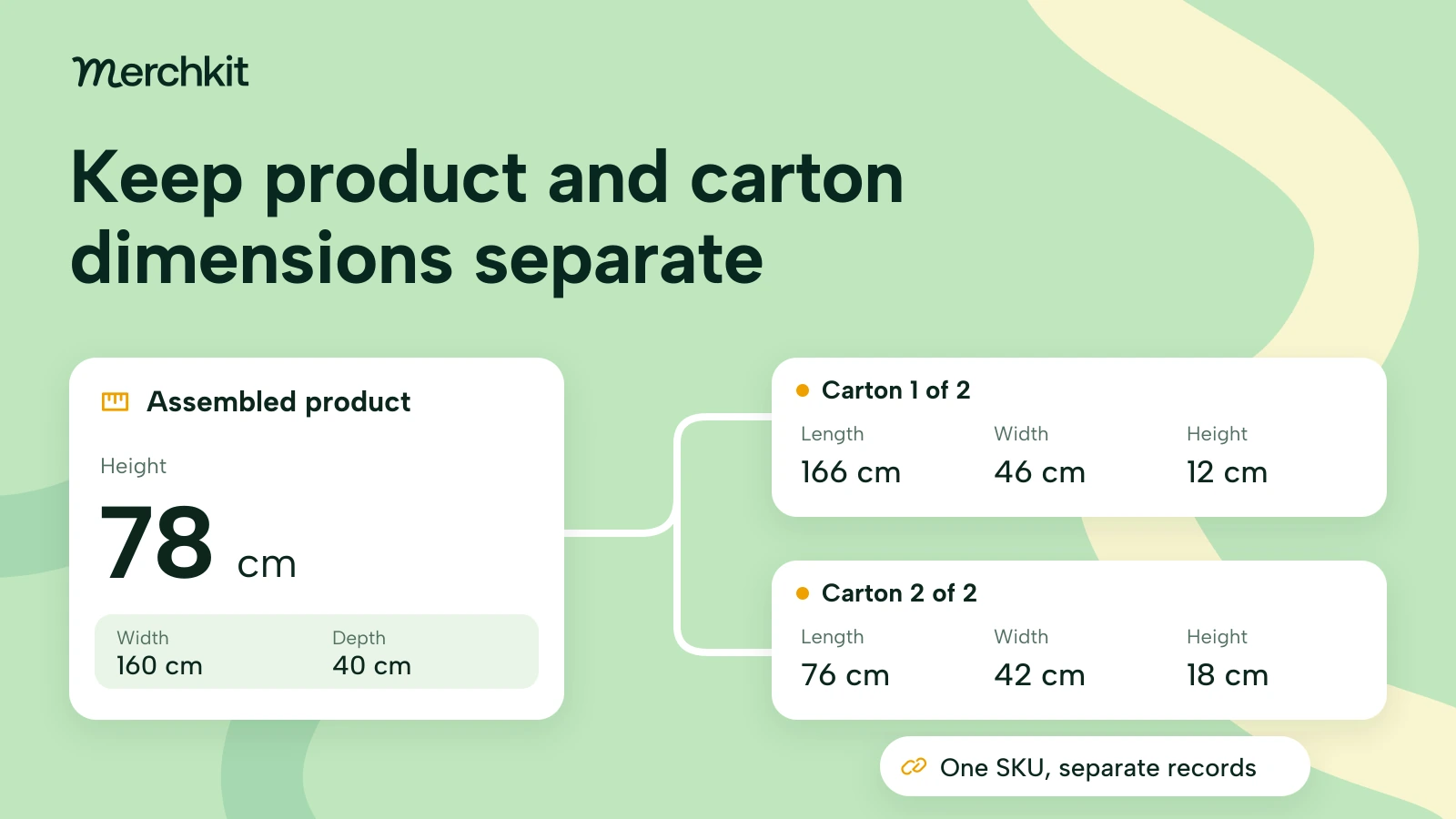
Consider a fictional Rowan sideboard, SKU ROWAN160, supplied in two cartons. Every identifier, measurement and source document below is invented to illustrate the mapping task.
| Record | Measurements with their original labels | Source context |
|---|---|---|
| ROWAN160 assembled item | Width 160 cm; depth 40 cm; height 78 cm | Product drawing, assembled view |
| ROWAN160 carton 1 of 2 | Length 166 cm; width 46 cm; height 12 cm | Packing sheet, carton 1 |
| ROWAN160 carton 2 of 2 | Length 76 cm; width 42 cm; height 18 cm | Packing sheet, carton 2 |
The import has three heights: 78, 12 and 18 cm. If every source label called Height maps to the same catalog field, whichever row is processed last could overwrite the others. The product page could then present an 18 cm tall sideboard even though all three source numbers were copied accurately.
Use separate assembled-item fields and carton records linked to the product. These are packing records for one SKU, not separate products to list for sale. Keep all three measurements together within each carton record, along with the carton identifier and source. If the catalog cannot store repeated carton records, retain a separate structured packing reference rather than squeezing the second carton into the first one's fields.
Do not add the two carton lengths or choose the largest value on each axis to invent a combined package. Neither operation establishes the dimensions of an actual shipment. Keep the original rows intact until the shipping team confirms how the cartons are handled.
Map product information and shipping information separately
Google distinguishes product measurements from package measurements. Its optional product_length, product_width and product_height attributes describe the product being sold. Google asks for the same measurement unit across those product dimensions. Google product measurement specification.
Its shipping_length, shipping_width and shipping_height attributes describe the package for carrier-calculated shipping. Google requires all three when any is provided, using the same unit. Each field is non-repeating. Google shipping dimension specification.
That creates two separate mapping decisions. The Rowan product page should draw its assembled measurements from the assembled row. Its shipping setup must account for the actual two-carton shipment, not reuse that row or quietly discard carton 2 to fit a single set of fields.
Have the shipping owner confirm the supported setup for the destination before handing over values. Preserve the carton records while that decision is unresolved. A complete internal packing reference is useful even when the destination needs a different representation; it prevents the feed template from becoming the only surviving record of the shipment.
Keep measurement labels in the content buyers see
A product page labeled only "Dimensions: 166 x 46 x 12 cm" would make Rowan's first carton look like the furniture itself. Use a clearly labeled assembled-size section, then a separate packaging section if you show delivery information. Name the axes in both places rather than relying on buyers to infer the order.
For this example, the assembled-size line would read: "Assembled width 160 cm, depth 40 cm, height 78 cm." The packaging section would identify two cartons and show each carton's measurements separately. A short description should use the assembled fields for furniture-size claims, not whichever dimensions happen to be available.
Apply the same separation to filters and comparison tables. A filter called Assembled width should never draw from a carton-width column. Otherwise, products could enter or leave a buyer's shortlist because of their packaging rather than their furniture dimensions.
Neither assembled measurements nor carton measurements alone establish that furniture will pass through a particular delivery route. Keep any delivery-fit assessment separate; do not generate a doorway-clearance promise from these fields.
Test whether the meaning survives an update
Test a small import with one single-carton item and one multi-carton item before expanding the mapping. Check the source, stored record, proposed description and destination output together. For Rowan, the assembled height must remain 78 cm, both carton rows must survive, and their measurements must stay attached to the right carton.
Then change only carton 2 in the test packing sheet. The assembled page dimensions should stay unchanged, while the second carton record reflects the reviewed revision. This test extends a product data completeness review by catching a shared-field overwrite that a check for empty values would miss.
Keep a source version or checked date and a reviewer with the mapping decision. If a supplier changes its column labels or packaging, revisit the affected records instead of assuming that a previously working rule still means the same thing. The goal is a repeatable handoff that preserves the buyer-facing meaning, not a larger collection of unlabeled numbers.
How this gets done in Merchkit
Merchkit can help furniture catalog teams prepare dimension attributes and product copy from supplier material, reducing repeated extraction and drafting. Your team still defines which measurements belong to the furniture, which belong to its cartons, and what the destination should receive.
Keep the evidence close to the item. Attach the product drawing and packing sheet as sources. Merchkit processes attached material for enrichment, so the team can reuse that context instead of pasting it into a separate prompt for every field. Confirm that the sources cover the exact item.
Set the measurement rules once. Configure custom attributes for the assembled measurements and any summaries you need. Reuse instructions that name the source section, axis and unit, and explicitly exclude carton values from furniture-size copy. Keep the full multi-carton reference available for review.
Prepare missing details across a selected batch. Run empty-only enrichment to populate configured fields without replacing existing values. This avoids separate generation for every product. Already-populated mistakes still need correction; filling gaps does not repair them.
Review the meaning before using the content. Inspect generated values and their rationales and source citations. Compare assembled values and carton records separately, then check the proposed page text. Your team retains the decision about what is accepted and how reviewed content is mapped downstream.
Book a Merchkit demo with a furniture drawing and a multi-carton packing sheet to explore a repeatable dimension-preparation workflow.