When an industrial product page says "100-pack" but labels its price "each," a buyer cannot tell whether quantity 2 means two pieces or two boxes. Define what one cart item contains, then keep that selling unit separate from supplier packaging and ordering rules. A correct part number is not enough if the customer cannot tell how much product they are buying.
Key takeaways
- State what quantity 1 contains, such as one box of 100 cable ties, beside the price and quantity selector.
- Keep package contents, boxes per offer, minimum order and order increments in separate fields.
- Google's multipack field describes identical products grouped by the retailer, not the contents of a manufacturer pack. Google multipack guidance
Define one selling unit before mapping a quantity
The selling unit is what one unit in the cart represents. It might be a single part, a box or a group of boxes. Spell it out before importing a supplier's "Pack qty" column, because that column alone may not explain the offer your customer can buy.
Consider a fictional cable-tie product. The manufacturer puts 100 identical ties in each box. The supplier ships cartons containing 10 boxes. Your store offers either one manufacturer box or a separate offer that your team assembles from three identical boxes. These are invented quantities for explaining the catalog task, not a real manufacturer's specification.
| Buyer facing detail | Single box offer | Retailer three box offer |
|---|---|---|
| What cart quantity 1 contains | 1 manufacturer box | 3 identical manufacturer boxes |
| Cable ties in each box | 100 | 100 |
| Cable ties in one selling unit | 100 | 300 |
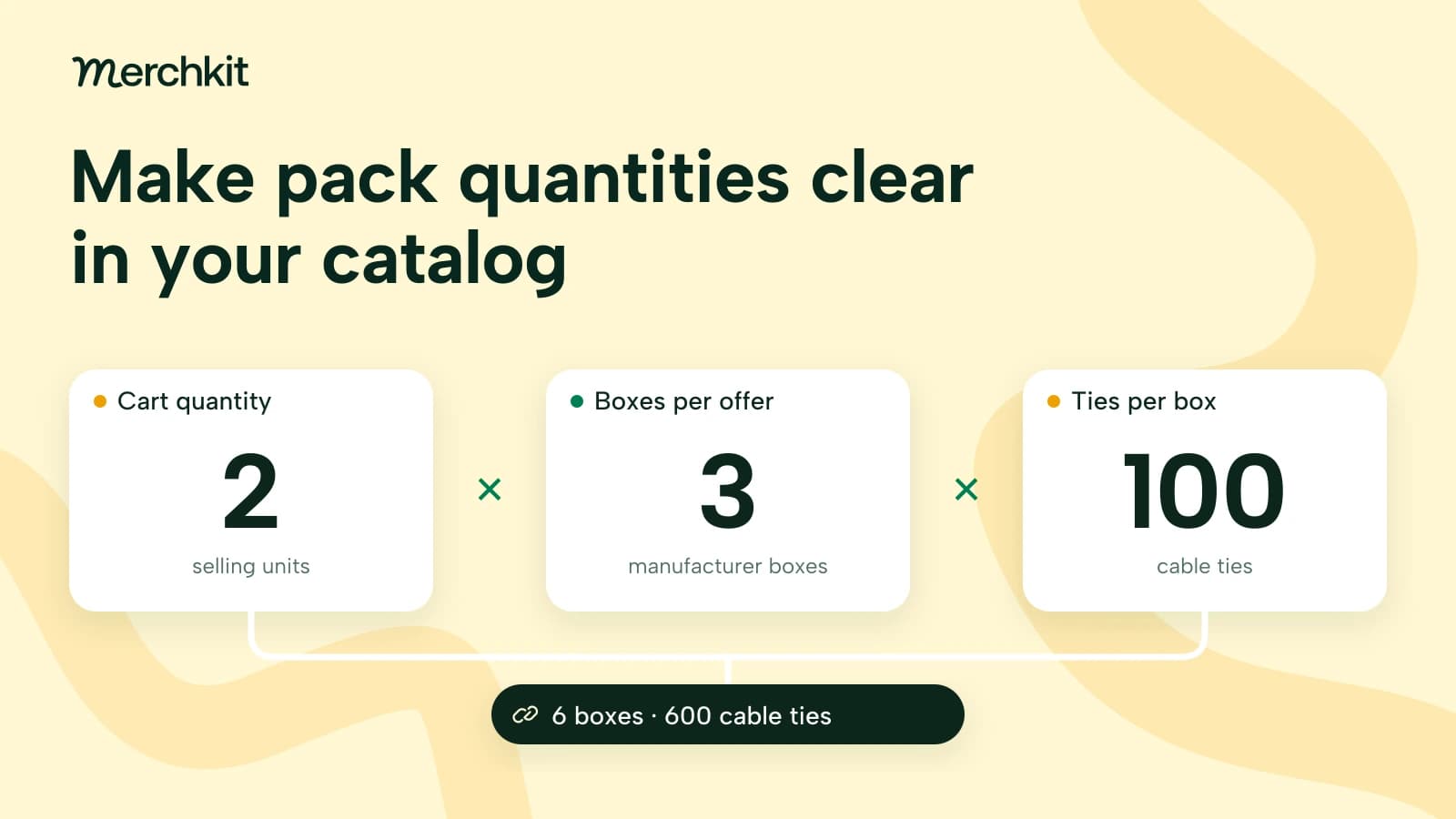
| What cart quantity 2 delivers | 2 boxes containing 200 ties | 6 boxes containing 600 ties |
| What the offer price covers | 1 box | The group of 3 boxes |
The table separates three counts that a single "Pack quantity" field would blur: ties in a box, boxes in the offer and offers in the cart. Store each relationship explicitly. Then a description writer can say "3 boxes of 100 cable ties, 300 ties total" without guessing whether 300 means boxes or pieces.
Keep the calculation with its inputs: cart quantity multiplied by boxes per selling unit multiplied by ties per box. For the three-box offer, quantity 2 means 2 × 3 × 100 = 600 ties. This is a review calculation for this example, not a universal rule for every product sold by weight, length or mixed contents.
Keep shipping cartons and order rules separate
The supplier's ten-box carton describes how stock arrives. In this example, it does not change the one-box or three-box offer. Copying 10 into the customer-facing pack field would imply a different purchase. Record the carton separately and confirm whether your business sells it intact or opens it to fulfill smaller orders.
Check abbreviated units too. If your warehouse uses "EA" for one stocked box, showing "each" without explanation could make a buyer think the price is per cable tie. Keep the internal code where operations need it, but label the storefront quantity "boxes" and say how many ties each contains.
A minimum order quantity answers another question: how many selling units must the buyer order? An order increment sets the permitted steps. A minimum of two boxes with increments of one permits two, three or four boxes. The same minimum with increments of two permits two, four or six. Neither changes the 100 ties inside each box.
Price needs the same clarity. In a separate fictional example, one box costs $12 and the buyer must purchase at least two boxes of that product. Google's price guidance requires the submitted price to cover the minimum quantity, so that offer would use $24, not $12. Make the minimum and price basis clear on the landing page too. Google price guidance
Map Google multipack from the offer
Google's multipack attribute counts identical manufacturer-defined products that the retailer groups for sale. It does not count the individual pieces inside a manufacturer-defined package. Applied to our fictional product:
Sell one manufacturer box of 100 ties: omit multipack.
Group three of those boxes into one retailer-created offer: use multipack of 3, not 300.
Sell a three-box case packaged by the manufacturer: omit multipack.
These examples apply Google's distinction between manufacturer packaging and retailer-created groups. A shopper selecting quantity 2, or a supplier listing "100 per box," does not by itself establish a retailer-created multipack. Check who created the offered group before mapping the field. Google multipack guidance
If buyers compare price per tie, keep that comparison separate from the total offer price. Google's unit_pricing_measure describes the total measured content and supports ct for count. The three-box offer contains 300 ct; the related base-measure field defines the comparison quantity. Review those fields together rather than using multipack for the content count. Google unit pricing measure guidance
Make the title and cart describe the same purchase
For the single-box offer, "Cable ties, box of 100" is clearer than "Cable ties, 100-pack" paired with an unexplained "each" price. Beside the quantity selector, show "Quantity in boxes" and "100 ties per box." For the three-box offer, say "3 boxes of 100, 300 ties total" and make clear that one cart unit buys that group.
Those statements should come from the reviewed quantity fields, not from separate guesses in the title, description and cart labels. If the offer changes from one box to three, review all three surfaces together. Otherwise, the title can advertise 300 ties while the cart still describes one box.
Before using a supplier's next file, test one product that sells as an individual item, one manufacturer pack and one retailer-created group. Check what quantity 1 and quantity 2 mean for each. Also test a missing pack count: the workflow should flag the unresolved quantity for your team, not quietly assume one piece.
Keep the supplier's original wording and your team's selling decision available to the reviewer. "100 per box" supports the contents; your approved offer definition supports how many boxes the customer receives. When those records disagree, resolve the offer before drafting public copy.
How this gets done in Merchkit
Merchkit can help prepare quantity details and descriptions across a selected product batch, reducing repeated transcription and drafting. Your team still decides what it sells and checks that the proposed content describes that offer.
Keep the packaging evidence with the product. Attach the supplier document and your approved offer description as sources. This gives enrichment the context for both the box contents and the selling decision, rather than asking a reviewer to reconstruct them for every draft. How sources work
Reuse clear instructions for each quantity. Create separate attributes for contents per box, boxes per selling unit and the buyer-facing quantity description. Explain each field in its prompt and instruct the AI to leave unsupported quantities unresolved. Reusing those instructions avoids rewriting the same distinctions for each product. Creating custom attributes
Prepare missing content across the batch. Run enrichment on selected products with the empty-attributes option when you need to preserve populated fields. That moves the team from drafting each missing description separately to reviewing proposed content together. Running your first enrichment
Review the purchase the buyer will see. Inspect proposed values and their rationales, including source references. Check the title against the box count and test the cart arithmetic before using accepted content downstream. Those offer checks remain your team's review responsibility. Reviewing AI content
Book a Merchkit demo with a supplier pack list and a few selling-unit examples to explore a clearer quantity-content workflow.