A buyer needs a valve with a 1/2-inch outlet, but your catalog only shows "Size: 1/2 inch." If that field mixes inlet and outlet data, the buyer cannot tell whether the product matches their request. They may shortlist the wrong item or contact your team for a detail the product page should explain. Keep the two connections separate so buyers can compare the end they actually need.
Key takeaways
- Give inlet and outlet their own fields. A buyer filtering for an outlet should not get a match based on an inlet's size.
- Keep the manufacturer's full size label. In the example below, one 1/2-inch label is a nominal size name; the other describes outside diameter.
- Carry those distinctions into titles and filters. They help buyers compare connections, but a matching size alone does not prove compatibility.
A second problem remains even after you separate the ends: two identical fractions can mean different things. "Nominal" is a size name that can differ from the measured outside diameter; "outside diameter," or OD, describes the distance across the outside of the tubing. The manufacturer example and chart below show why that wording must stay with the number.
Give the inlet and outlet separate fields
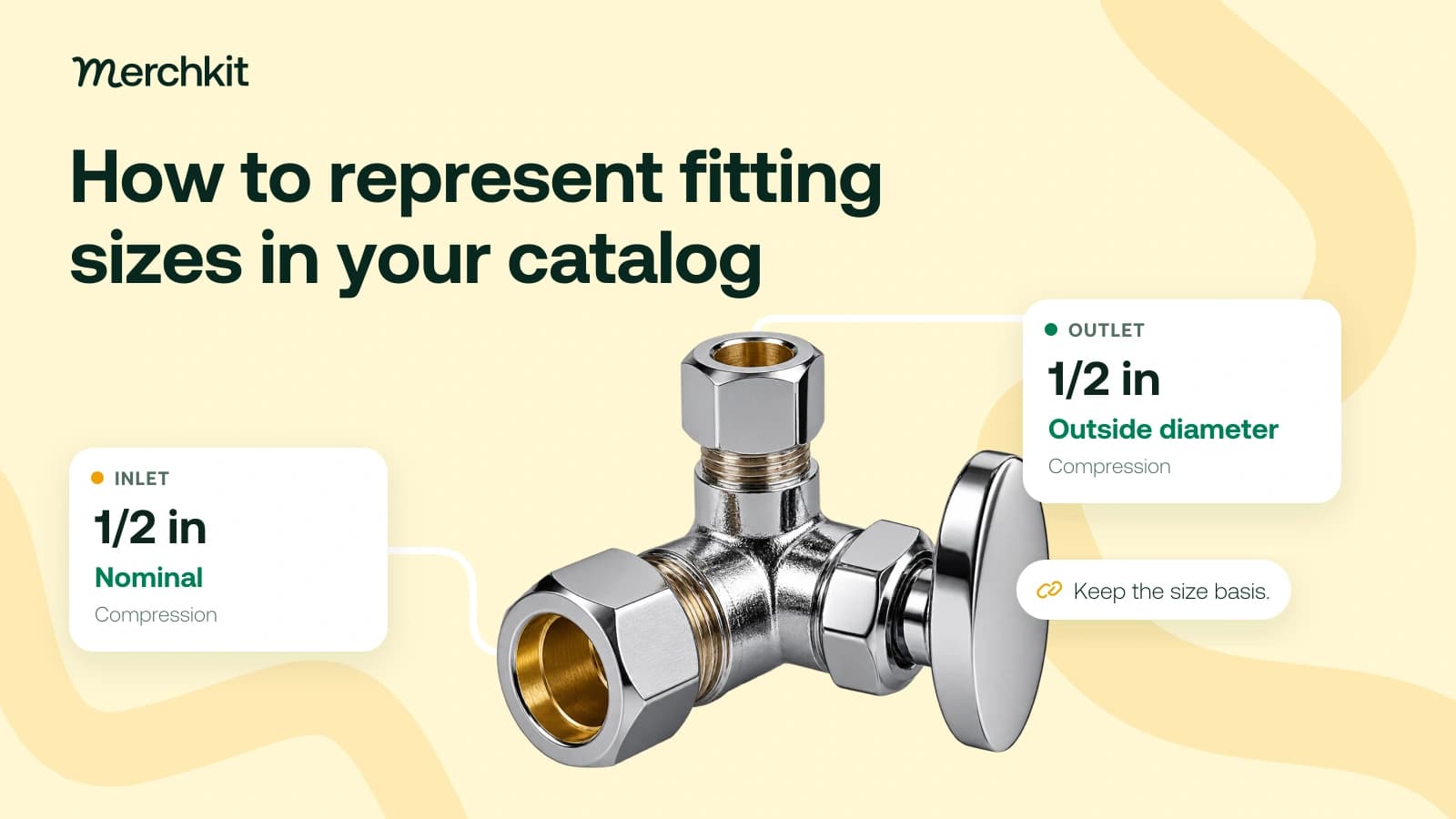
BrassCraft lists KTCR39X C with a 1/2 inch nominal compression inlet and a 1/2 inch outside-diameter compression outlet. A product page shortened to "1/2 inch x 1/2 inch" would hide the nominal-versus-OD distinction from someone comparing the connections.
The table preserves the description of each end. "Size basis" means what the number describes: a nominal size designation or an outside diameter. "Connection method" keeps the manufacturer's compression label with the correct end. This is a manually prepared catalog example.
| End | Size | Size basis | Connection method |
|---|---|---|---|
| Inlet | 1/2 in | Nominal | Compression |
| Outlet | 1/2 in | Outside diameter | Compression |
Keep the inlet details together and the outlet details together under the full manufacturer part number. Link that part number to your internal product code, or SKU, so the import reaches the right item.
In a spreadsheet, use separate inlet and outlet columns. In a system with related records, create one record per end. Both approaches should prevent the catalog from losing track of which side a value describes.
Keep the supplier's original wording beside the standardized fields used by your catalog. For example, changing "OD" to "outside diameter" makes the label easier to read without changing its meaning. Removing the words altogether would leave a buyer comparing unexplained numbers.
If the source leaves the end or size description unclear, ask for clarification instead of copying the convention from a similar product.
Separate nominal size from measured dimensions
The BrassCraft conversion chart makes the distinction concrete: its 1/2 inch nominal entry corresponds to 5/8 inch outside diameter for copper tube, CPVC and PEX. In that chart, a "1/2 inch nominal" label does not mean a measured outside diameter of 1/2 inch.
A filter that treats every "1/2 inch" value as the same measurement could therefore combine unlike choices. Keep the chart's material scope with any lookup. It does not describe the valve body's dimensions or prove that two products can connect.
A unit conversion answers "What is this measurement in millimeters?" A nominal-size lookup answers "Which physical size does this label refer to in this chart?" They are different tasks.
Save a looked-up value separately from the supplier label, with the chart and materials it applies to. Do not use nominal size to invent other measurements, such as bore diameter or thread pitch.
Make the detail useful in filters and copy
Give a title or description generator the size, its meaning and the connection method for each end. For the worked item, a proposed description is:
"1/2 inch nominal compression inlet x 1/2 inch OD compression outlet."
A buyer can now see which description belongs to the inlet and which belongs to the outlet. "1/2 inch compression" would make them reopen the specification to recover those details.
Where the storefront supports separate filters, label them clearly: Inlet nominal size and Outlet outside diameter tell buyers what they are narrowing. A single Size filter does not.
Use the same reviewed facts on the product page. If the filter and description disagree, buyers have to decide which one to trust.
Clear labels also give search and AI systems more specific facts to work with. They still cannot establish that a connection is suitable for a particular job. Compatibility needs its own approved evidence, including the relevant connection method, application and pressure requirements. This catalog cleanup is not an installation or engineering assessment.
Check a sample before expanding the batch
Before applying the setup to a full supplier batch, use a simple worksheet to check whether an unfamiliar reviewer can describe both ends correctly. Include:
The exact part number, whether the row describes the inlet or outlet, and the original supplier label.
The size and unit, whether the size is nominal or outside diameter, and the connection method.
The source URL, revision when stated, the page or section to check, and any unanswered questions.
Include products with the same number on both ends, different numbers and a missing size description. Check that inlet and outlet values have not been swapped and that words such as "nominal" or "OD" survived the import. A filled Size column alone would not reveal those errors.
Resolve conflicting descriptions before accepting the affected fields. If the size meaning remains unknown, keep it flagged for follow-up rather than allowing an unsupported label into a filter or product title.
How this gets done in Merchkit
Merchkit helps prepare these attributes across a selected batch, so the team can produce clearer connection descriptions without rewriting every supplier label. You define the inlet and outlet questions once, reuse them across the products, and review the proposed answers before buyers see them.
Keep the manufacturer's description with the item. Attach the matching page or specification. Product sources give enrichment the material to work from; confirm the full part number so another valve's details do not enter the record.
Ask the same clear questions across the batch. Configure custom attributes, the product-detail fields you want to fill, for each end: What size is stated? Is it nominal or outside diameter? Which connection method is listed? Require source support and leave missing answers for review.
Prepare missing details in bulk. Use empty-only generation to propose values for blank fields while preserving populated ones. The shared instructions replace separate prompts for each supplier description.
Check the description a buyer will read. Review the generated values and rationales, meaning the explanations behind the answers, against the source. Confirm both ends before using the fields in titles, filters or exports. If the same mistake recurs, improve the shared instructions.
Book a Merchkit demo with a small plumbing catalog sample to discuss how to prepare connection attributes without losing their meaning.